Blog:
How do you choose a good agenda builder?
21 October 2026 minute read
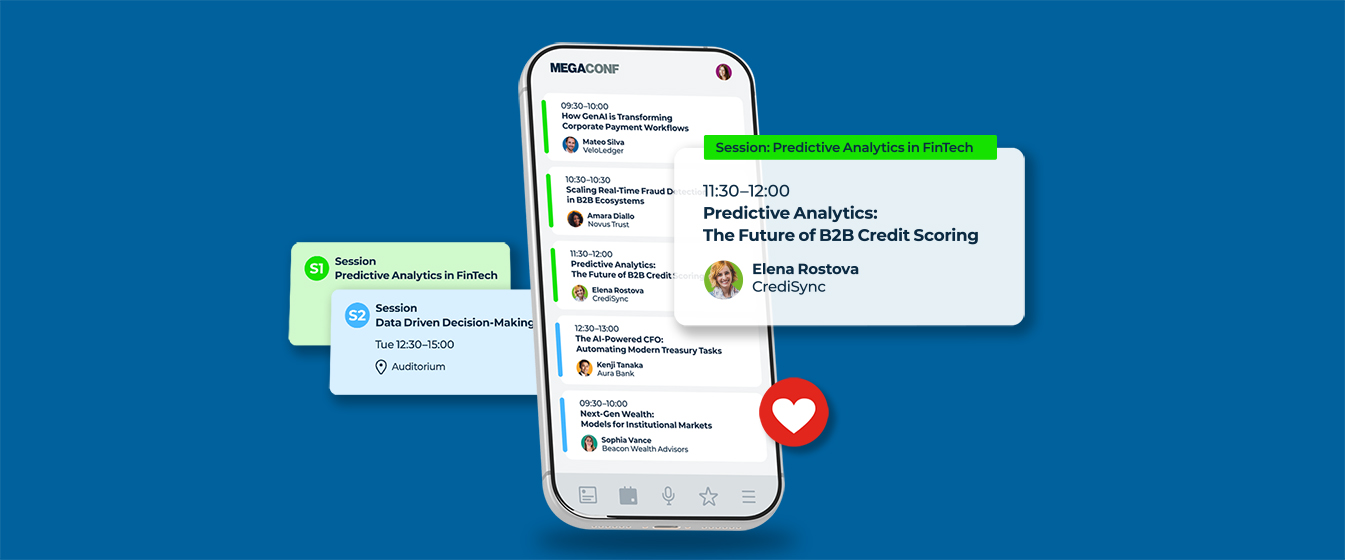
Existing users of AttendZen already know that we have the most powerful and intuitive agenda builder of any event platform out there. Just sayin’. And we’ve recently deployed a couple of enhancements that we think make it even better. More on that story later.
But all of this got us thinking: what do producers really want from an agenda builder in an event platform anyway? Plenty of platforms don’t have one at all (have fun in Excel). Others say they have one, and maybe it’s drag & drop and blah blah blah.
But what should you be looking for if you really want to save yourself time and stress, while improving the accuracy (and attractiveness) of your biggest asset?
Well, based on hundreds of customer demos (and dozens of upgrades) of our own agenda builder, here are the features you might want to ask to see (and try for yourself) next time you’re looking at a digital tool to build and market a conference programme.
Before we get started though, if your preferred method of building and selling an agenda involves sticking lots of bits of paper to the office wall, moving them around, picking them up off the floor and then gradually iterating a large PDF file that you upload to your landing page before updating and reissuing it multiple times a week, look away now.
Or maybe keep reading?
1 Shaping your agenda
Back to those Post-it notes. However you do it, the early stages of programme design are inherently messy. You’ve got unconfirmed speakers, fluid session ideas, shifting panel structures, and several possible thematic tracks – all of which you’re trying to balance and mould into something that makes sense.
The first problem we see here is that basic agenda tools force you to input specific dates, start times, end times, and room assignments before a session can even exist in the matrix. And this completely stifles the creative, iterative process of building a good agenda.
So, start by looking for a digital ‘scratchpad’ feature – like a parking lot or sidebar – where you can store draft session ideas before you know exactly when in the day they should sit. Once you’re ready to structure the day, you simply grab these unassigned blocks and slide them onto the timeline.
Honestly, this one feature can save you hours (and perhaps even your sanity).
From there, look closely at how the interface works. You should be able to effortlessly move, extend, compress, or add sessions via a genuine, fluid drag-and-drop interface.
To be clear, ‘drag & drop’ in this context means you can visually place, resize and rearrange individual sessions, tracks, and agenda blocks with your mouse.
When you’re evaluating this, have the vendor move and adjust real sessions live so you can see how conflicts and capacity limits are handled.
You need an agenda builder to be easy enough to use, but with plenty of power features in case you need them.
For example, something else we recently added is what we’re calling a Nudge button.
It’s a function that allows you move multiple sessions by a fixed amount of time, together. For example, you might want to delay every session that starts after 2pm by 10 minutes if your operations manager tells you there’s been a change of access to the venue. Our Nudge button lets you do that in seconds, without adjusting every individual session by the same amount.
Basically, if a system relies on a clunky, form-based UI – where changing a simple 30-minute time slot requires opening a modal, typing in numbers manually, saving, and waiting for a page to refresh – it’s inevitably going to slow you down. So, look for an interface that’s so intuitive and delightful to use that you can pick it up in minutes and won’t resent the hell out of using it every week.
2Flexible, custom session formats and standardisation
Producers know that not every session at an event fits one uniform template. A morning keynote requires entirely different information fields to an academic panel, a sponsored lunch-and-learn workshop, a technical demonstration, or a VIP networking reception.
The problems arise when your software forces you to use a one-size-fits-all format, because you have to kludge speakers, moderators, titles etc, into a generic modal – resulting in your website and mobile app looking untidy, amateurish and often lacking the specific data attendees need to decide which session to attend.
A good agenda tool solves this by allowing you to easily and quickly build (and save) custom session formats from scratch. You should be able to define the exact structural blueprint you need for each specific session type – configuring dedicated fields for elements such as presenters and guest speakers, panel moderators and session chairs, academic co-authors and institutional affiliations, room locations, virtual streaming links, sponsor branding, downloadable presentation slide PDFs, and so on.
Crucially, defining your session formats in advance creates an internal design system that ensures consistency – however large or remote your team. When multiple colleagues, members, agencies or external stakeholders are collaborating on the same large-scale event, custom formats enforce strict presentation consistency across the board. It ensures that, regardless of who inputs the session details, nobody forgets a critical field or breaks your established guidelines. And you end up with a front-end agenda that looks flawless and is easy for delegates to use.
3Native integration with abstract management tools
If you are managing an academic, scientific, medical, or other research-heavy conference, you might be using an abstract submission tool to handle the Call for Papers and peer review work. If so, getting your selected submissions and manually copy and pasting titles, speaker bios, and multi-paragraph abstracts from that portal into an event management platform introduces a significant risk of human error. It also sucks up hundreds of hours of valuable production time.
So for your own sake, don’t do it. A serious event platform will offer seamless, native integrations with specialised third-party abstract management tools, such as Oxford Abstracts and similar. But know this: not all integrations are created equal! Check if the tool allows you to import data fluidly, with granular control over how the fields map to your agenda.
At a minimum you should be able to:
- Pull in a complete, peer-reviewed programme in bulk
- Move content over selectively, session-by-session
- Import and sync a single paper at a time as final edits are approved
Most importantly, the system should intelligently map complex academic data structures, easily handling the nuances between presenting authors and co-authors, managing distinct institutional affiliations, and formatting abstract texts without disrupting your layout or losing special characters.
4Automated clash detection and multi-track conflict resolution
Managing programmes with multiple parallel tracks presents a whole other set of challenges. If you’re running four, eight, or twelve parallel tracks across an entire convention centre, get one thing wrong and you can easily derail a live event day for a lot of people.
So don’t settle for a tool that simply lets you view parallel tracks side-by-side; look for a degree of in-built intelligence that actively looks for potential schedule clashes, physical room conflicts etc, and automatically flags them in real time.
Say you accidentally book a popular speaker for concurrent slots across different tracks, or you mistakenly assign two panels to the same physical breakout room at 2pm. Your platform should immediately trigger a visual alert. Having an intelligent scheduling system means you can confidently shuffle sessions around last-minute, knowing the software is double-checking your work and protecting the integrity of your logistics behind the scenes.
5A single source of truth (time to move on from the PDF?)
The first thing an experienced producer learns when they finish building an agenda is that they have not, in fact, finished building that agenda.
There will be innumerable changes to it between it being ‘finished’ and the end of the event itself. Late additions, speaker substitutions, time swaps, incorrect job-titles or mistakes in company names – all are inevitable.
In the traditional event planning workflow, each change would trigger a series of administrative steps, as tedious as they are avoidable. You’d have to locate the original master spreadsheet, update an old-fashioned static PDF of your programme, re-export it, upload the new file to your website CMS, update the mobile app via a manual sync, and pray that attendees aren’t looking at a cached version on their phones the next morning.
Answer honestly: has anyone on your team ever maintained their own, personal version of the event agenda that’s just a bit different from your version?
A modern event platform eliminates this mess by turning the agenda builder into the heart of the whole event. Look for a tool engineered around a strict ‘single source of truth’ architecture. When you make an edit, tweak a timing block, or swap a speaker within your backend agenda builder, that change should automatically and instantly push out to every touchpoint across your event environment:
Your event website The public-facing agenda, speaker bio pages, and track filters update instantly for prospective registrants.
Your attendee mobile app The agenda and personal schedule builders, push notifications, and daily planners update in the pockets of your attendees on-site.
Your virtual event space The online environment, live-streaming countdown clocks, reminders and prompts.
Moving away from static PDFs and disconnected, modular plug-ins will save countless hours of manual replication. More importantly, it guarantees that your event data is never wrong, significantly reducing the number of confused people showing up at the registration desk.
6Focus on your production workflow
No two events are the same – and that goes for event teams too. Usually, you recruit speakers and build out a programme in the particular way you do for good reasons – based on how your particular market or community responds.
So, when you’re evaluating a new event management platform, don’t let the salesperson distract you with their flashy marketing slides or expansive feature checklists. If you want to know whether a platform will actually save you time, and eliminate your bottlenecks, ask for a deep-dive demonstration focused purely on the agility of the agenda builder.
Watch how many clicks it takes to move a session, observe how it handles a last-minute track split, and look closely at how that change propagates across the app and web.
Think about the time you spent and the problems you encountered building and maintaining your last agenda. Imagine how you’d like the programme to look and behave on a customer’s device.
Believe me, if the process feels rigid during a controlled demo, it will be a hundred times worse when you come to use it yourself during the high-stress weeks leading up to a major conference.
So, there you have it.
I’m afraid we can’t eliminate the speaker who calls you the night before and wants to change slots from morning to afternoon. Or the chair who wants to reconfigure a technical session into a panel discussion during the actual coffee break. That’s the B2B events life, amigo. You just have to roll with it.
But if you want a smart, intuitive agenda builder as the beating heart of an equally smart event management and marketing platform? That, we can give you.